This article will give you an overview of what functionality is on the Dashboard.
TABLE OF CONTENTS
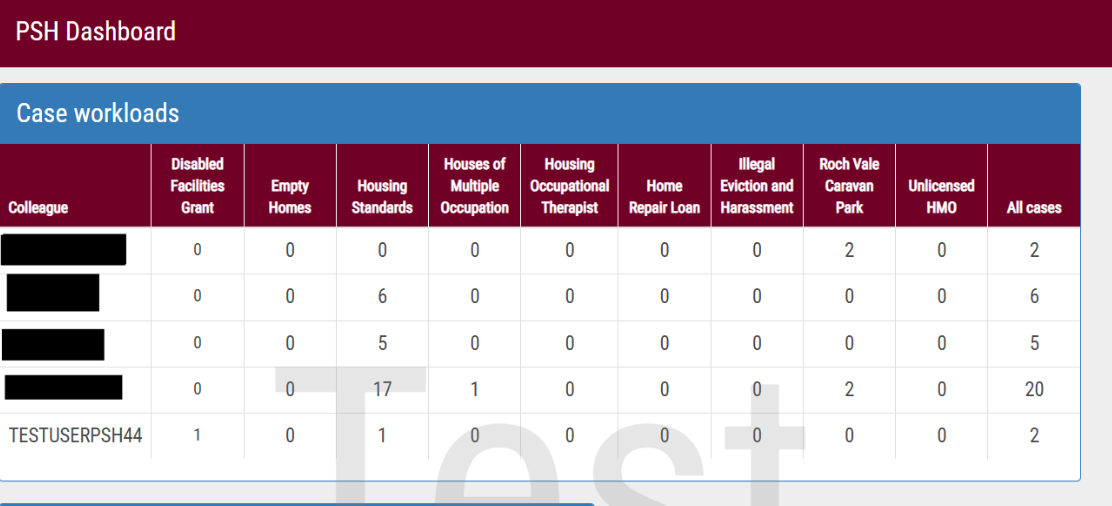
Case Workloads
The case workloads widget displays totals of all open cases for broken down by
- Case Type
- Officer
Clicking on an officer displays all cases that officer has regardless of the type of case.
This page can be organised by:
- Property
- Property Owner
- Next Step (next task in the workflow)
- Client
- Case
PSH Workloads
The PSH workloads widget helps users to keep track of where they are up to with tasks on their cases, the widget displays a list of:
- Cases
- Overdue tasks
- Tasks due today
- Tasks due this week
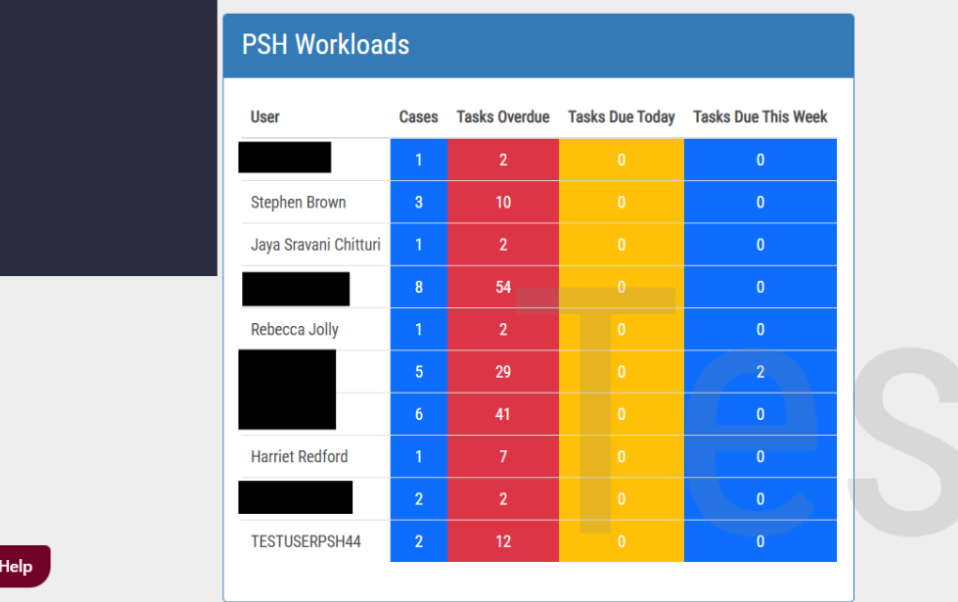
Each section is interactive, allowing users to drill down into tasks which are due or overdue due on their cases. This view offers a clearer way to track case progress and manage caseloads effectively.
Was this article helpful?
That’s Great!
Thank you for your feedback
Sorry! We couldn't be helpful
Thank you for your feedback
Feedback sent
We appreciate your effort and will try to fix the article