Select a shortlist with a status of ‘ready to nominate
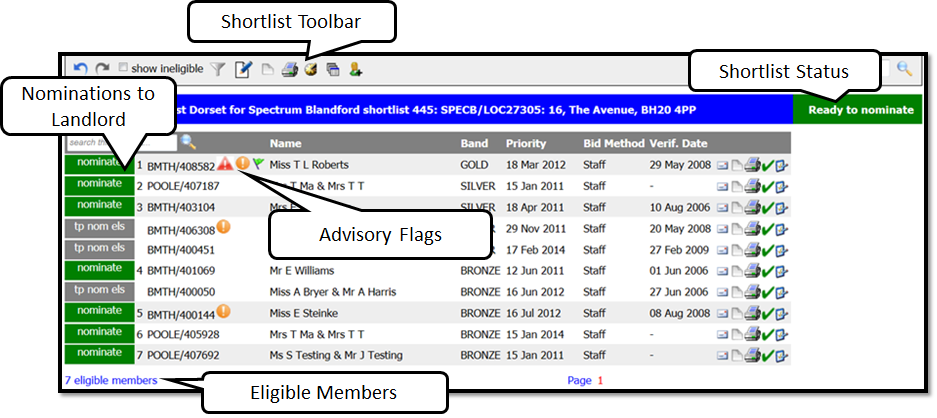
Shortlist Toolbar Key:
 | Undo or redo last action |
 | By ticking the box, members who are ineligible will be appear on shortlist greyed out |
 | Edit filters for this shortlist |
 | Edit shortlist filters |
 | Add note to shortlist. Note icon will change to Yellow when note is added. |
 | Print shortlist |
 | Snapshot of history each time a member is offered |
 | Add a member directly to shortlist |
 | Once member is nominated this icon appears select button to Send Nominations to Landlord |
 | Once member is nominated this icon appears. It is used to clear nominations |
 | Withdrawn shortlist (manager permission only) USE WITH CAUTION |
 | Reset shortlist (manager permission only) USE WITH CAUTION |
If you need to reset a shortlist back to Ready to Nominate, follow these steps:
- On the advert click the red cross.

- Set the dropdown to Ready to nominate and click Withdraw shortlist, you may have to set a reason. Then it will come up with a warning pop up saying withdrawing, click ok.
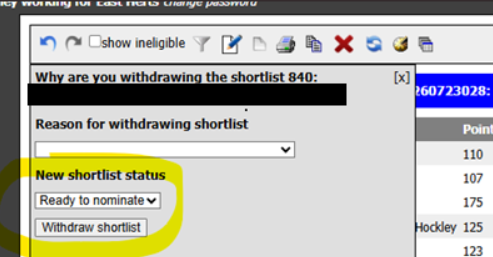
The shortlist will refresh and then the nomination button appears to send over more nominations.

Was this article helpful?
That’s Great!
Thank you for your feedback
Sorry! We couldn't be helpful
Thank you for your feedback
Feedback sent
We appreciate your effort and will try to fix the article